Your calendar only reminds you — not your guests. Timelier connects to your Google, Outlook, Apple iCloud, or ICS calendar to automatically send tailored email and SMS reminders to your attendees, clients, and team so everyone shows up on time.

 Google Calendar
 Microsoft Outlook / 365
 Apple iCloud CalDAV
Set up your automated reminder engine in under three minutes. Timelier operates quietly in the cloud so you never miss an appointment.
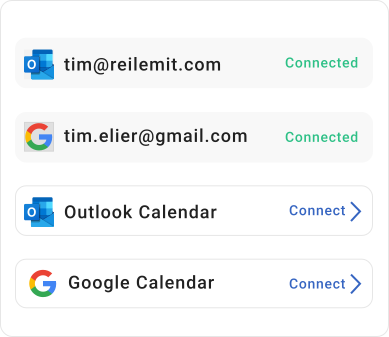
Timelier integrates with Google, Outlook, and Apple iCloud Calendars and also supports ICS links (from Google, Outlook, Apple, booking platforms, school calendars, sports calendars, etc.).
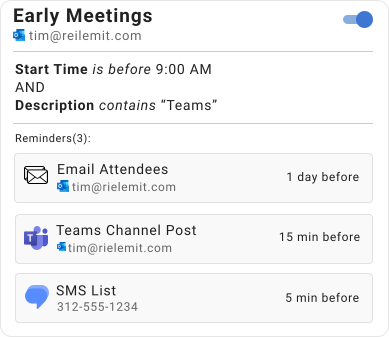
Set which meetings and appointments should receive reminders and how, when, and to whom the reminders are sent.
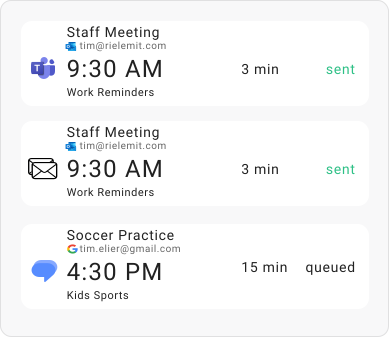
Your reminders are sent automatically — to you, your guests, or whoever you choose.
Everything you need to eliminate no-shows and keep clients, students, and colleagues punctual.
Aggregate Google, Outlook, Apple iCloud, and ICS calendars into one centralized monitoring system without juggling separate tools.
High-open-rate text messages delivered straight to mobile devices.
Deliver emails containing agendas, meeting URLs, and location details directly to attendee inboxes.
Automatically extract phone numbers or email addresses from calendar event descriptions to notify appointment guests.
Trigger alerts only for specific events matching keywords like "Consultation" or "Lesson", while easily excluding "Tentative" or "Canceled".
You can, for example, schedule a 24-hour advance preparation email followed by a 15-minute SMS alert for the same meeting to ensure complete attendance.
Discover how coaches, consultants, and service businesses use Timelier to automate daily client communication.
Keep students, parents, and athletes informed about upcoming music lessons, tutoring sessions, and sports training without manual reminders.
Read Teachers & Coaches GuideProtect billable hours and avoid empty video call waiting rooms. Send automated reminders for sales discovery calls and client check-ins.
Read Freelancers GuideSee how automating calendar reminders transformed schedules for busy professionals, teams, and families.
“My clients get reminders like clockwork — I don’t even think about it anymore.”

“I don’t have to send reminder texts anymore. Timelier just does it for me.”

“Finally a way to get multiple reminders for my Outlook events!”

“I connected my Outlook calendar and had reminders going out within minutes. Super simple.”

“Our sales reps are having more meetings and starting more of them on time.”

“I use it for work, but also for my family’s shared calendar. No more worrying my husband won’t pick the kids up on time.”

Everything you need to know about automated meeting reminders for Google Calendar, Outlook, and Apple iCloud.
No. Google Calendar's built-in notifications and email alerts are only delivered to you on your personal account—Google does not send automated reminder emails or SMS texts to your invited meeting guests or clients. Timelier solves this by connecting to your Google Calendar and automatically dispatching personalized email and SMS reminders directly to your invitees before each event. Learn more in our guide on how to send reminders to guests for Google Calendar appointments.
Microsoft Outlook only displays desktop popup alerts for the meeting organizer and does not offer automated reminder emails or SMS for other attendees. With Timelier, you connect your Outlook or Microsoft 365 calendar in one click, set a timing rule (such as 24 hours or 1 hour before), and Timelier automatically emails or texts your attendees with meeting agendas and video links. Read our step-by-step tutorial on how to send meeting reminders for Outlook Calendar.
Yes. Timelier works seamlessly with Google Calendar, Microsoft Outlook / 365, Apple iCloud, and ICS subscription feeds. It can automatically extract attendee phone numbers from event descriptions or invitee fields and send reliable SMS reminders with live segment tracking. Explore our guides on Google Calendar SMS reminders and Outlook SMS text reminders.
No. Your meeting guests and clients receive standard SMS text messages and clean, professional emails directly to their phones or inboxes. They do not need to download software, install an app, or sign up for an account to receive reminders.
Join hundreds of professionals who save time and eliminate missed meetings with Timelier. Set up in less than 3 minutes.
Start Your 14-Day Free Trial