
Learn how to verify mobile phone numbers in Timelier to deliver automated SMS text notifications, comply with telecom carrier guidelines, and unlock full recurring sending allowances.
Overview & Telecom Compliance
Timelier delivers automated SMS appointment alerts using leading enterprise telecom infrastructure. Because wireless carriers enforce strict consumer protection rules, sending is very limited to numbers that have not explicitly opted-in and include a clear opt-out mechanisms.
Verifying a phone number confirms that the recipient agrees to receive appointment reminders from you via Timelier. Once verified, numbers are registered under your account and are exempt from the restrictive per-recipient delivery caps applied to unverified numbers.
Sending Limits: Verified vs. Unverified Phone Numbers
To adhere to telecom anti-spam regulations and prevent unauthorized mass messaging, Timelier enforces distinct dispatch thresholds based on whether a destination phone number has been verified:
| Recipient Status | Daily Limit (Per Number) | Monthly Limit (Per Number) | Behavior & Purpose |
|---|---|---|---|
| Unverified Number |
1 reminder / day | 4 reminders / month | If an automation rule schedules additional reminders for
the same unverified number on the same day, subsequent messages that day are skipped with code
skipped-unverified-limit.
|
| Verified Number (Completed SMS opt-in) |
Unlimited (Up to plan quota) |
Unlimited (Up to plan quota) |
Per-recipient limits are removed. Verified recipients can receive multiple alerts per day, recurring appointment series, and critical schedule updates. |
Sending a Verification Request
To verify a client, colleague, or team member's mobile phone number:
In the Timelier left sidebar, click Channels. Find the SMS via Timelier card and click the edit / manage icon (), opening the Manage Verified Phone Numbers screen.
In the To: input field, type the recipient's 10-digit U.S. mobile phone number (e.g.
3125551212). Timelier automatically validates the format and prepends the +1
country code.
Provide identifying details so the recipient knows who is requesting permission:
- Sender Name: Enter your full name or company name (e.g. Dr. Smith or Acme Support).
- Sender Email: Select an authorized email address associated with your account.
The Message Preview box shows the exact single-segment text message that will be dispatched to their phone:
Click Send Verification to dispatch the SMS text immediately.
Completing Verification
Verification can be completed through either of two convenient methods:
- One-Click Link on Mobile (Recommended): The recipient opens the text message on their phone and taps the secure confirmation link (`app.timelier.com/v-sms?t=...`). On the web page, they check the consent box ("By verifying this number, I agree to receive SMS messages from Timelier...") and tap Verify Code.
- Manual Code Entry: The recipient provides the 6-digit verification code from their text. Under the Pending Verification list in your Timelier dashboard, enter the code into the box next to their phone number and click Verify.
Managing Pending Phone Verifications
All active verification requests appear in the Pending Verification list:
- 24-Hour Expiration: Verification codes remain active for 24 hours. If a code expires before verification is completed, a fresh request must be sent.
- Resend Button: If the text message was accidentally deleted or delayed by carrier filters, click Resend next to the pending number.
- Cooldown Protection: To prevent carrier rate limits and carrier spam blocks, a 60-second cooldown timer () is enforced between resend requests.
Using Verified Phone Numbers in Reminder Rules
Verified phone numbers can be utilized across both Simple Rules and Advanced Reminder Rules:
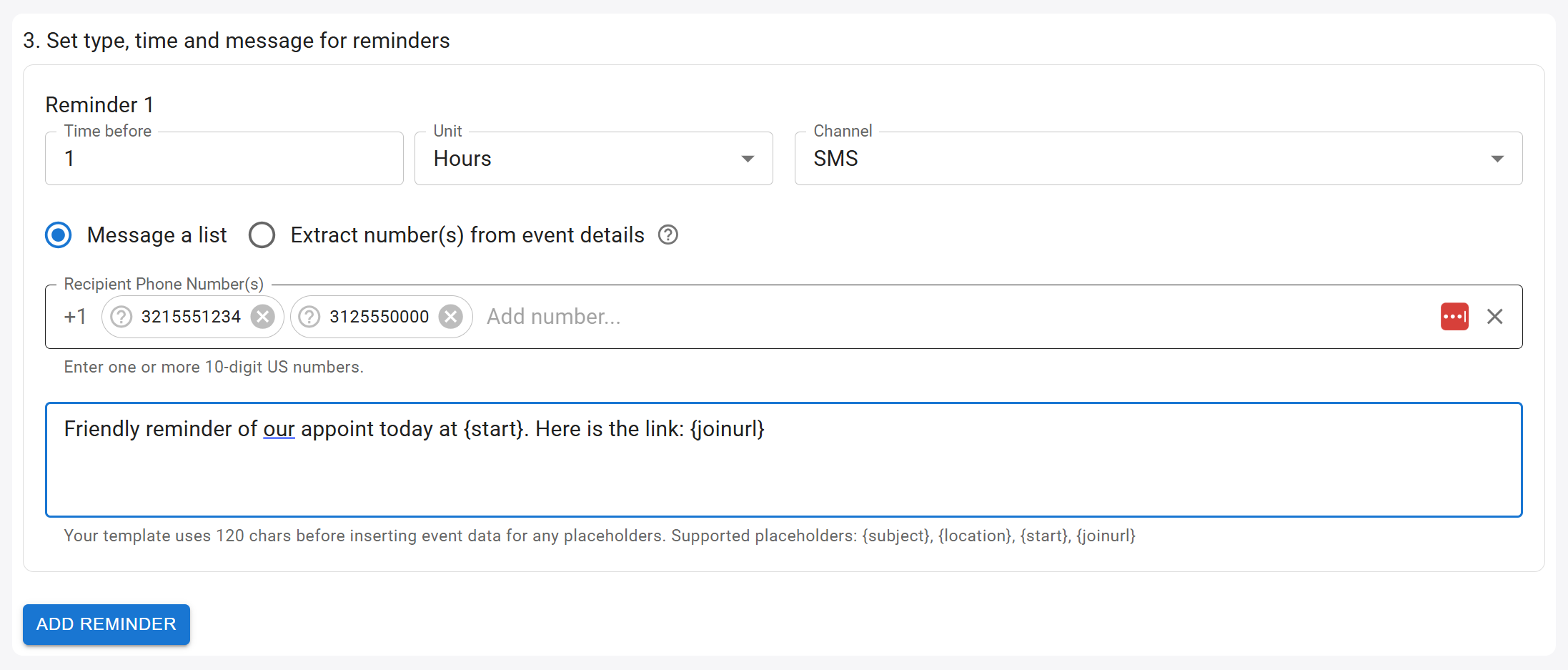
In Advanced Rules, choose SMS as the channel and add recipient mobile numbers under "Message a list" or extract them from event notes.
- Static Recipient Lists (Message a list): In the rule editor, select Message a list and enter the verified phone number. The number will be saved as a permanent destination for all matching calendar events.
- Dynamic Event Extraction (Extract numbers from event details): When rules are
configured to extract numbers using
SMS Reminder: [phone number], Timelier automatically cross-references the extracted phone number against your verified list. If verified, the per-recipient limit is lifted automatically.
Opt-Outs & STOP Requests (TCPA Compliance)
Recipient autonomy is strictly enforced across all Timelier SMS reminder communications:
- Replying STOP: At any time, a recipient can reply with STOP, CANCEL, UNSUBSCRIBE, or QUIT to any reminder text.
- Immediate Suppression: Upon receiving an opt-out keyword, Timelier instantly marks
the number as opted out. Future scheduled reminders for this
number will be skipped with code
skipped-opted-out. - Resuming Notifications (UNSTOP / START): To opt back in, the recipient must text START or UNSTOP to the Timelier sending number. For legal compliance reasons, account owners cannot manually override a recipient's opt-out status on their behalf.